
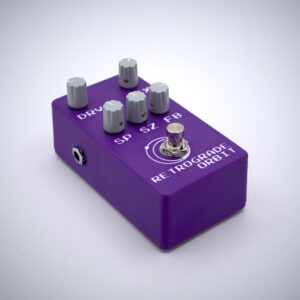
Retrograde Orbit is a bit different from a typical delay pedal and it offers a wide range of delay times and retro color. Before getting into that, first an explanation of the knobs:
| Knob | Function | Description |
| DRV | Volume / Drive | Volume into Op-Amp Saturation |
| MIX | Dry / Wet Mix | Mix of original signal and delay |
| SP | Speed | The speed of the sampling / the sample rate |
| SZ | Size | The size of the delay buffer (it’s “memory”) |
| FB | Feedback | How much of the delay is fed back into the delay |
Drive can be thought of as volume but allows for some op-amp saturation/distortion when using an instrument (line-level) source as well as most pickups though some low gain pickups may be a bit too quiet to get the full saturation. Consider putting the pedal after another gain pedal if you want more saturation with quiet pickups.
Mix controls the dry wet. It is a passive mixer which means towards the middle of the knob the signal can get a bit softer. You can offset this with drive or, if you don’t want to add saturation, can compensate by adjusting the input volume in the next pedal in the chain. A “quirk” of the mix is that, at full wet, it still provides the original signal only the signal runs through the delay circuit. This means you can “sample-crush” the raw input and the delay at the same time by adjusting the speed knob.
The way the delay works is by a combination of the speed (sample-rate) and size (memory). Retrograde Orbit uses a variable sampling rate to drive both the DAC and ADC. The rate is controlled by the speed knob. Fully clockwise, it runs at a very high sampling rate (around 60KHz) which means most of the “retro” aliasing is not present. As the knob is turned to the left, the sampling rate lowers which begins to bring in more of a retro sound and pushes the aliasing more into the audible range. This also can rolloff the highs at very low rates. As the sample-rate decreases, the delay time increases. Meaning this is one way to dial in your preferred delay time.
Size, on the other hand, is how big the ring buffer is. The ring buffer can be thought of as the delay’s memory. You can also think of it a bit like a tape loop. Small size means small loop which means a shorter delay. Large size means a large loop and, thus, a longer delay. Continuing with the tape analogy, speed is akin to running the tape slower of faster. Even though the tape loop is the same size, the slower the speed is, the longer it takes to run through a full loop. That is very similar to what is happening here. Note that unlike Speed, the Size does not impact the audible quality of the delay.
Feedback is not too dissimilar from other delays, although it does allow for near infinite delays and can be “turned up to 11” for positive feedback if you fancy cacophonous noise.
Because both Speed and Size can control delay times, there is an interplay between each other which can be initially a bit confusing. If you are having trouble figuring out how things work, start by turning the Speed fully to the right and just focusing on Size. This turns Retrograde Orbit into more of a conventional modern digital delay. When you’re ready to add the retro part, you can then mess around with the Speed. If you want a very retro sound, you will want to turn the speed down fairly low and compensate by adjusting the size to taste. This is also how you can get very (very) long delays.